Overview
The EMS Employee App is a web-based application designed to support employees and management in performing daily operational activities efficiently. Through this application, employees can access essential features such as attendance recording and other employee-related services, while ensuring compliance with company policies and procedures.
Since the application is web-based, it can be accessed across multiple devices without requiring the installation of a native mobile app. Users only need a compatible web browser and an internet connection to get started.
Access Application
Access the employee page at: https://employees.ems.sentec.io This page is accessible on both smartphones and desktop/laptop computers.
Note
It is recommended to use Google Chrome on Android devices and Safari on iOS devices for the best user experience.
Switch Language
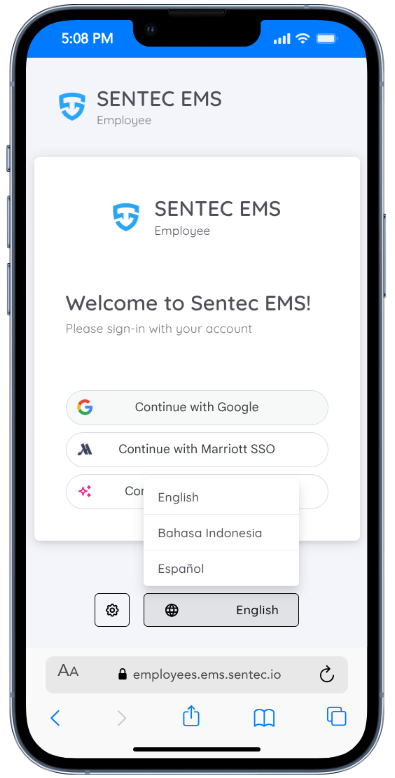
On the Sentec EMS Employee page, users can switch the application language to enhance their experience.
Currently, Sentec EMS supports the following languages:
- English
- Bahasa Indonesia
- Spanish (Español)
The language switcher menu can be accessed from the login page.
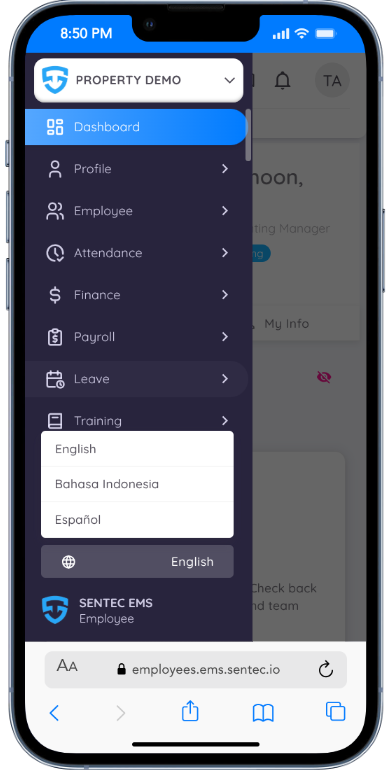
Users can also access the language setting from the sidebar menu after logging in.
Clear Data
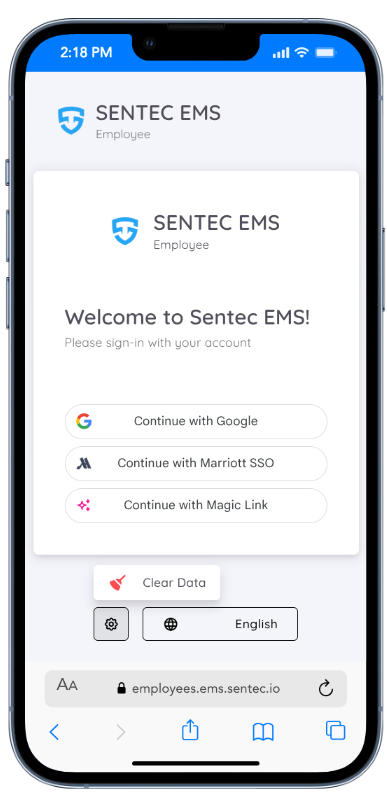
To help resolve common issues such as login errors, loading problems, or unexpected behavior in the EMS Employee App, we have added an additional Clear Data option on the login page.
This feature allows employees to clear temporary data stored in the browser, such as cache or session data, without affecting their account or personal information. Using this option can often fix issues caused by outdated or corrupted data.
If you experience any difficulties while accessing or using the application, we recommend trying this step before contacting support.
When to Use Clear Data?
- The application fails to load properly
- You are unable to log in despite entering correct credentials
- The page appears blank or stuck
- Recent updates are not reflected in the application
After clearing the data, please refresh the page and log in again to continue using the EMS Employee App.
NOTE
For most common issues, please refer to the FAQ.