Contract Evaluation
The Contract Evaluation feature allows the company to evaluate an employee's current contract and determine the appropriate next contract status based on the evaluation results, employee performance, and other relevant criteria.
In the Employee Portal, only the Head of Department (HOD) and/or Property Leader are authorized to create Contract Evaluations for employees within their respective departments.
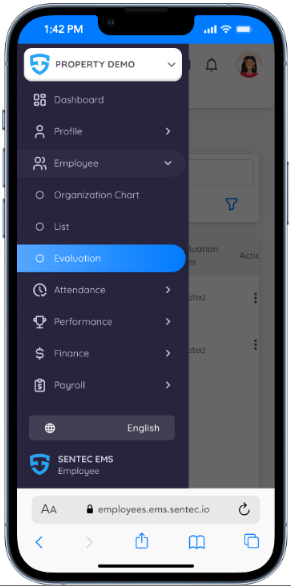
This feature can be accessed from the Employee Portal by navigating to:
Employee Menu → Evaluation
Create Contract Evaluation
Contract Evaluation can be created in two ways:
- Created by Management/HR.
- Created by the Head of Department (HOD).
When a Contract Evaluation is created by the HOD, the HOD will automatically be assigned as the Reviewer for the evaluation. This helps streamline the review process and ensures that the evaluation is handled by the appropriate department authority.
During the Contract Evaluation creation process, the HOD can configure and manage several evaluation details, including:
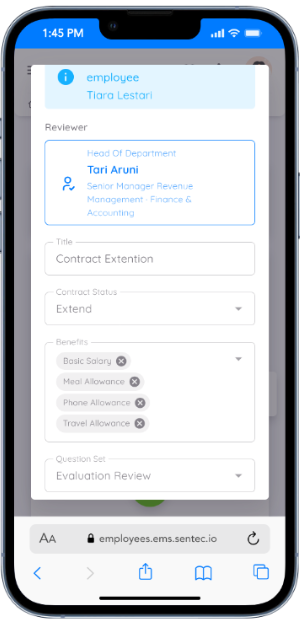
- Evaluation Title – Add a title to clearly identify and categorize the Contract Evaluation.
- Contract Status – Determine the employee's next contract status based on the evaluation outcome, such as Promotion, Demotion, Extension, Renewal, or Termination.
- Benefits Update – Review and update the employee's benefits as part of the contract adjustment process.
- Question Set Selection – Select the appropriate evaluation question set from the available templates based on the organization's evaluation requirements.
Review Contract Evaluation
Once a Contract Evaluation has been created by Management or the HOD, the assigned Reviewer can access the evaluation through:
- The email notification sent to the assigned Reviewer.
- The Employee Portal by navigating to Employee Menu → Evaluation.
This menu provides easier access to and tracking of Contract Evaluations assigned to the reviewer.
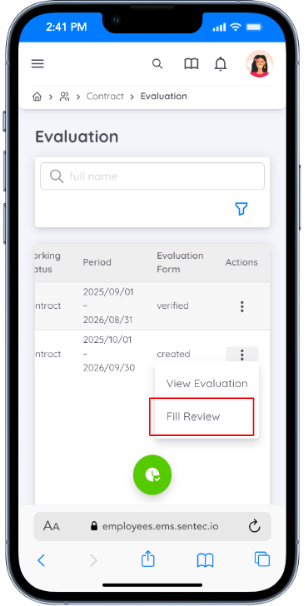
The assigned Reviewer can access the evaluation directly from this page to review and complete the assigned assessment.
The Reviewer can:
- Review the employee's current contract details.
- Complete the evaluation form.
- Answer the assigned evaluation questions.
- Provide responses and feedback.
- Review and update contract-related information.
- Upload supporting documents when necessary.
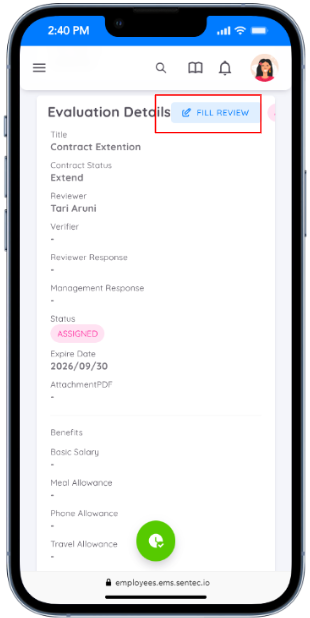
The Fill Review action can also be accessed from the Evaluation Details page. This allows the Reviewer to complete the evaluation while viewing the employee's full evaluation and contract details.
Fill Review
During the review process, the Reviewer can complete the following information:
1. Review Current Contract Details
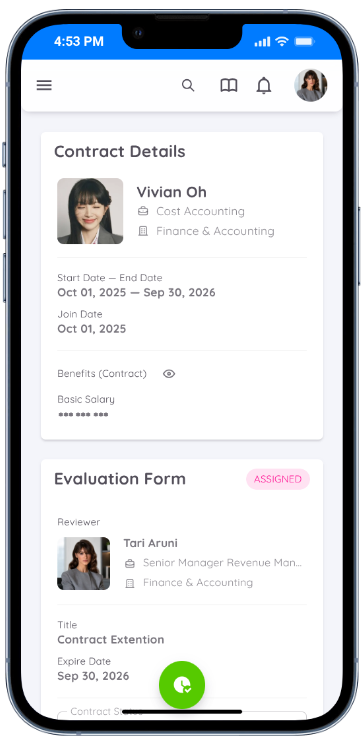
The Reviewer can view the employee's current contract details, including employment information, contract period, benefits, salary, and reporting structure.
This information provides the necessary context to support a more informed contract evaluation.
2. Determine the Next Contract Status
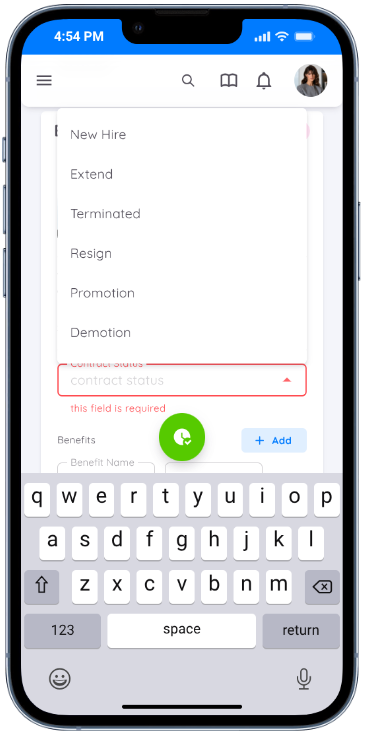
The Reviewer can determine the employee's next contract status based on the evaluation results and overall employee performance.
The available contract status may include:
- Promotion
- Demotion
- Extension
- Resign
- Terminated
3. Update Employee Benefits
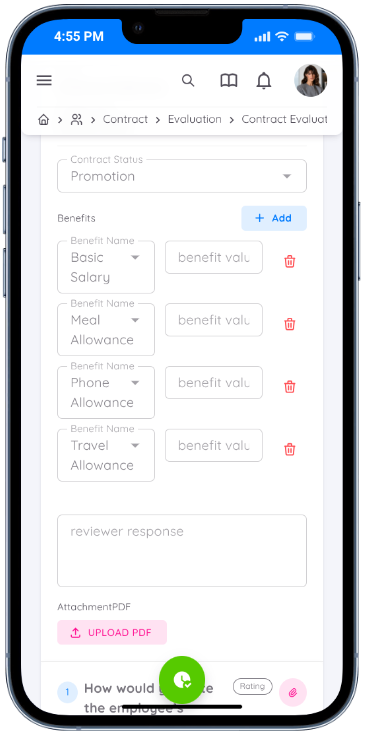
If there are changes to the employee's benefits, such as a basic salary revision or other benefit updates, the Reviewer can click Add to include and manage the updated benefit information.
If no changes are required, the employee's existing benefits can be retained without adjustment as part of the Contract Evaluation process.
4. Provide Responses and Feedback
The Reviewer can provide responses, comments, and feedback during the Contract Evaluation process.
This information can be used to support the evaluation outcome and provide additional context for the contract-related decision.
5. Upload Supporting Documents
The Reviewer can upload supporting documents or references when necessary.
For example, relevant supporting documentation can be uploaded in PDF format to provide additional information or justification for the evaluation.
6. Complete the Question Set
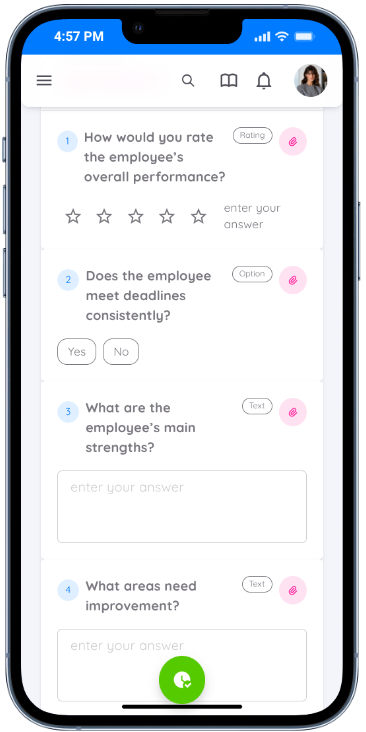
The Reviewer may be required to answer the evaluation questions assigned as part of the Contract Evaluation process.
The questions are based on the Question Set selected during the creation of the Contract Evaluation.
If necessary, the Reviewer can also upload supporting documents, such as PDF files, to provide additional references, justifications, or relevant information related to the questions.
7. Save as Draft
The Reviewer can save the evaluation as a Draft before submitting it.
Once the evaluation is saved as a draft:
- The evaluation remains editable.
- The Reviewer can continue updating the evaluation.
- The Submit Evaluation button becomes available.
- The evaluation can be reviewed and completed before final submission.
As long as the evaluation remains in Draft status, the Reviewer can update or modify the evaluation details.
8. Submit the Evaluation
To finalize the evaluation, click the Submit Evaluation button.
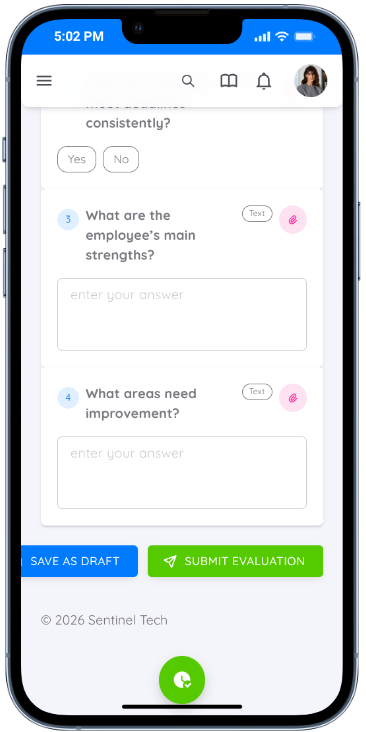
Once the evaluation is submitted:
- The evaluation is finalized.
- The Reviewer or Evaluator can no longer update or modify the evaluation details.
- The evaluation is submitted to Management for verification.
Contract Evaluation Verification
After the evaluation has been submitted, Management must review and verify the evaluation before proceeding with the next contract action.
Once Management has completed the verification, the evaluation status will change to Verified.
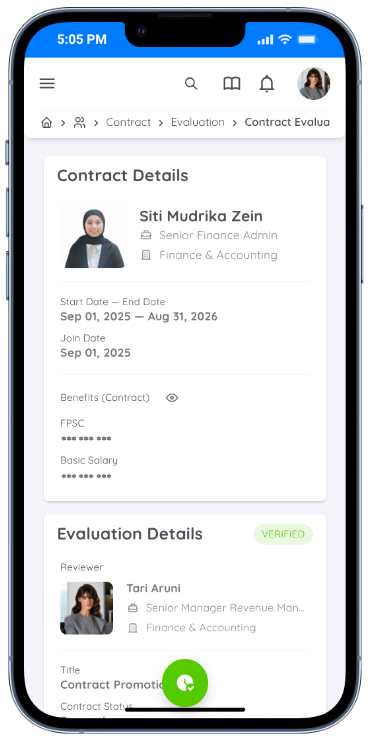
After verification, the evaluation details can be accessed for further reference and the verified evaluation can be used as the basis for the next contract action.
Depending on the evaluation outcome, Management can proceed with the appropriate contract action, such as:
- Updating the employee's existing contract.
- Creating a new contract.
- Extending the contract.
- Renewing the contract.
- Processing a promotion or demotion.
- Processing contract termination.